Getting started
How do I get started?
There are three steps, and there is nothing technical to set up.
1. Describe your ideal customer in plain words under Find customers. If you have a list of your best customers, you can also paste at least 3 of their websites, and we learn the profile from their sites.
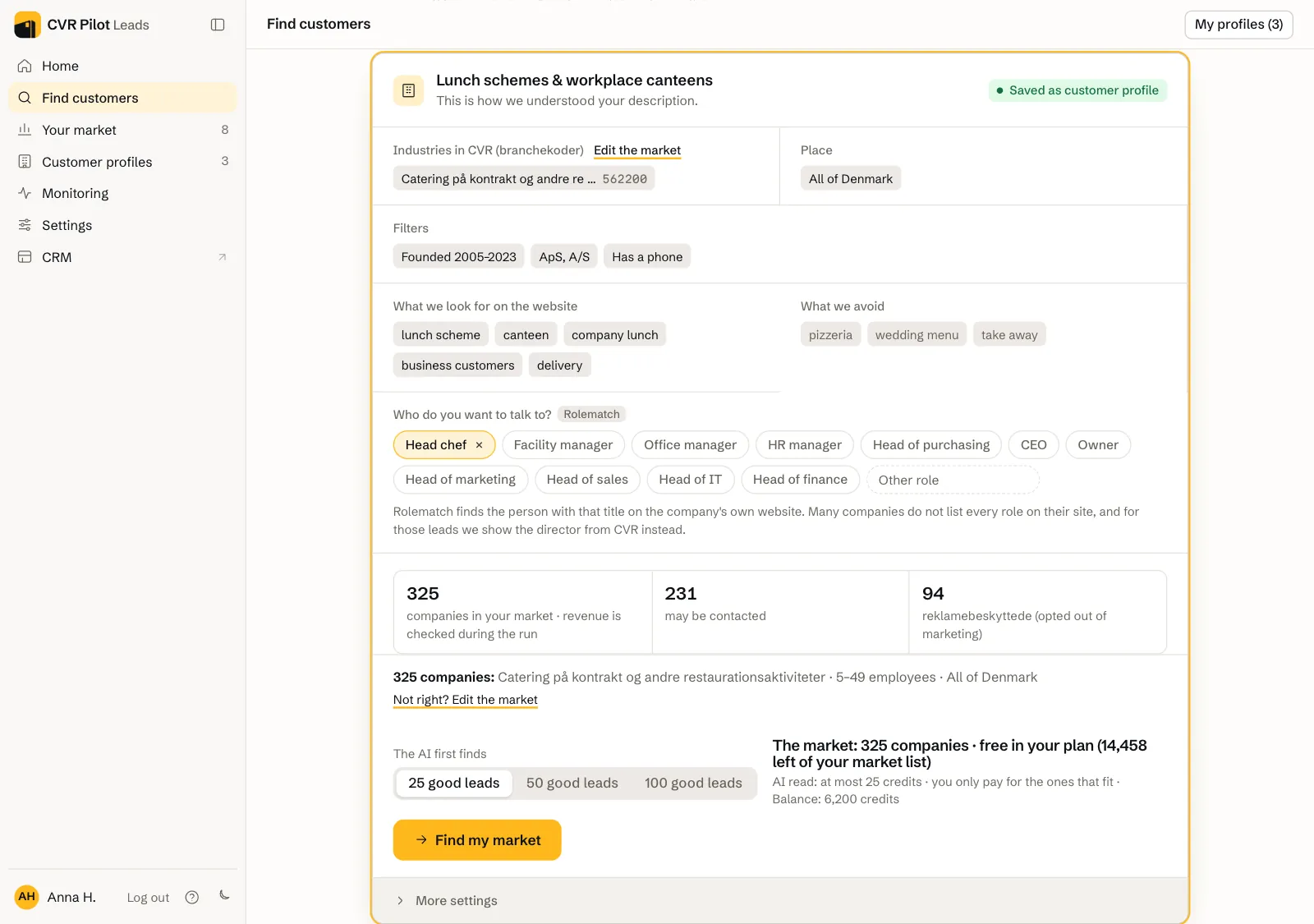
2. Read the customer profile. The card shows how we understood your description: the industries in CVR, the area, the words we look for on the website, what we avoid, and the search terms we use on Google Maps. Below that, it shows how many companies your market holds, how many may be contacted, and how many are opted out of marketing (reklamebeskyttet). Answer the questions on the card if there are any.
3. Press "Find my market". First choose how many good leads the AI should find (25, 50 or 100). After a few seconds the whole market is under Your market. The AI reads the best first, and the leads it has read get a fit score, a quote and a contact person.
What is a search?
A search is one pass over your market. We fetch every company in CVR that matches the industry, area, size and your filters, including those without a website. Phone, e-mail, address, number of employees and directors come from the register, and Google Maps adds companies and phone numbers. The list is under Your market after a few seconds.
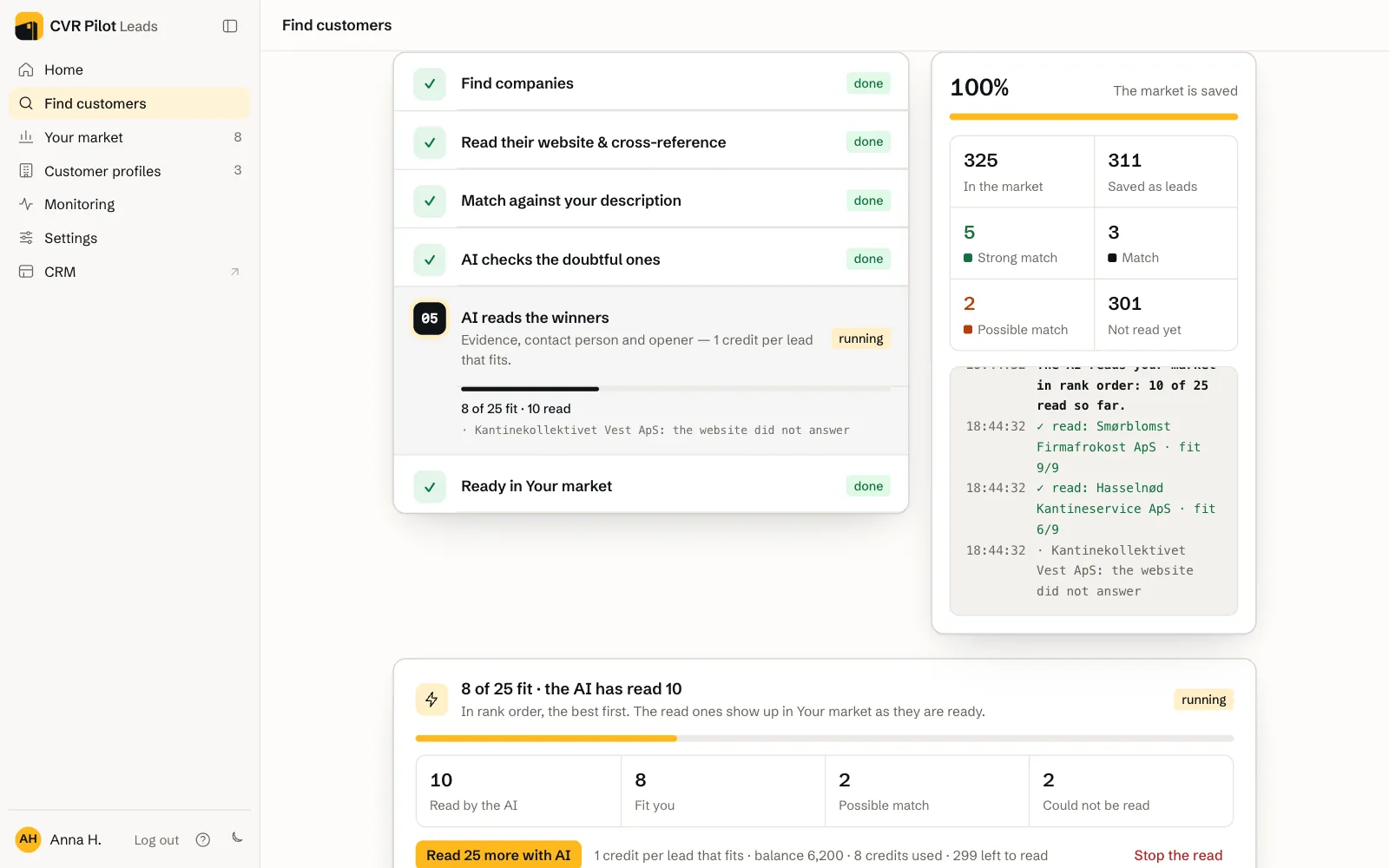
Then the AI reads the websites, the best first, and marks each company as Strong match, Match or Possible match with a reason. It keeps reading until you have the number of good leads you asked for. The ones the AI has not read are marked Not read yet, and you can have more of them read afterwards. On a plan the reading continues on our server, so you can close the page. Every search is listed afterwards under Home → Since last time.
Where do the leads come from?
We fetch them straight from the sources when you search: the CVR register (by industry code), Google Maps, public listings on the web and the websites you paste yourself. We keep no stored database that goes stale. Your market is read afresh on every search.
How does the AI build a profile from my customers?
Under Find customers you will find "Do you have a list of your best customers?". Paste their websites or CVR numbers, or drop in a CSV or TXT file. We read up to 10 of the sites, put the words we found first in the profile and derive the industry codes from your real customers. The card shows how many sites we read. Your customers are never suggested as leads. This requires a plan.
Can CVR Pilot find new leads on its own?
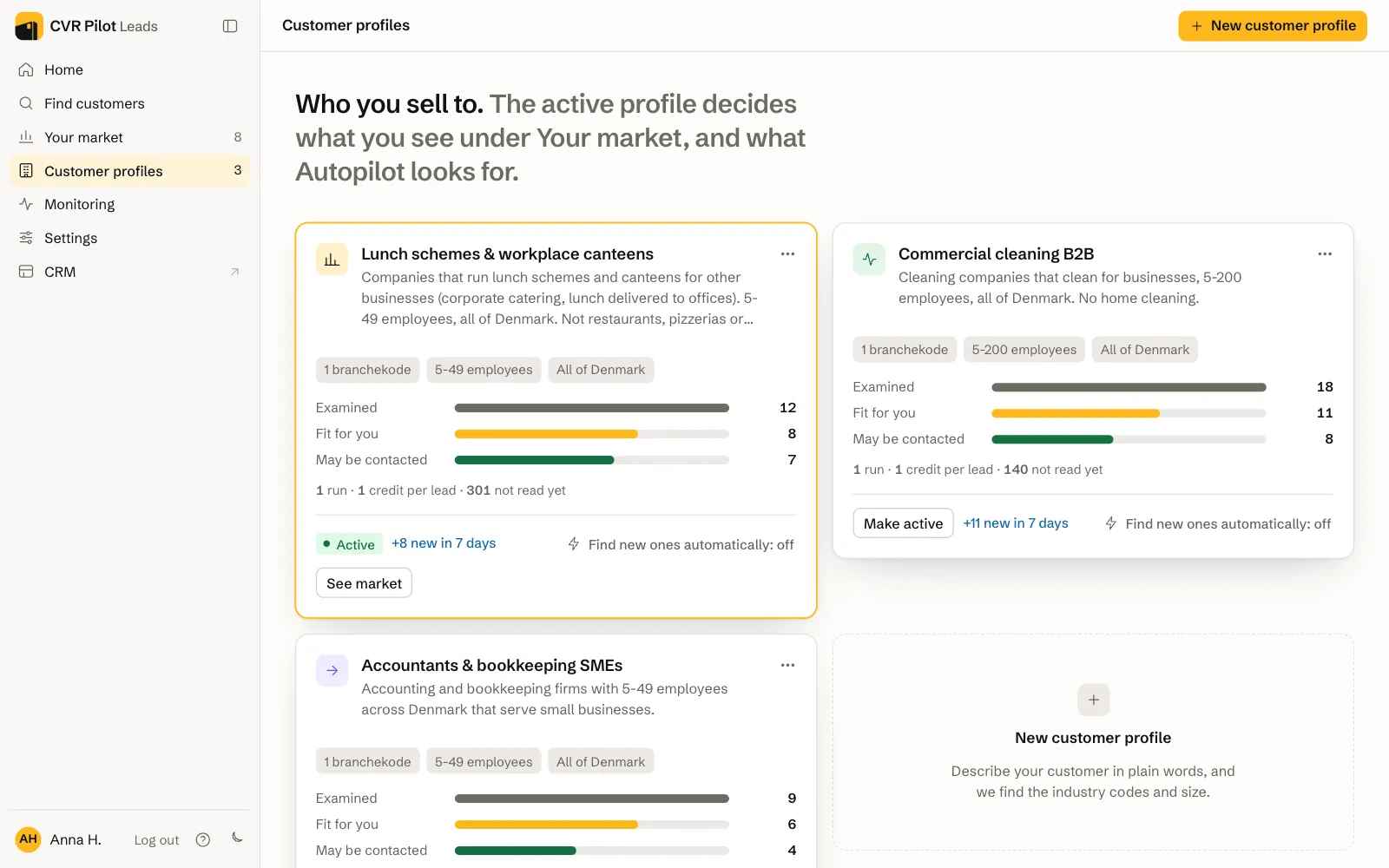
Yes, with Autopilot. It sits on the card for each customer profile under Customer profiles, where it says "Find new ones automatically". Click it and choose how often Autopilot searches (every week or every month), how many leads it may find at most each time, and how strictly it sorts. Autopilot searches one customer profile at a time, and each lead costs 1 credit, the same as when you search yourself. Autopilot comes with Growth. On Starter you get a weekly e-mail about new companies in CVR instead.
Qualification and fit score
How does CVR Pilot decide whether a lead is a fit?
The whole market goes on the list. Before the AI reads anything, we sort the companies by how well their register data matches your profile, so the most promising are read first. The AI reads the websites in that order and gives each company a fit score with a reason. We only take companies out when they clearly don't belong: the wrong industry, ceased or bankrupt, public workplaces when you have opted out of them, and the ones you have excluded yourself.
What does fit score 1-9 mean?
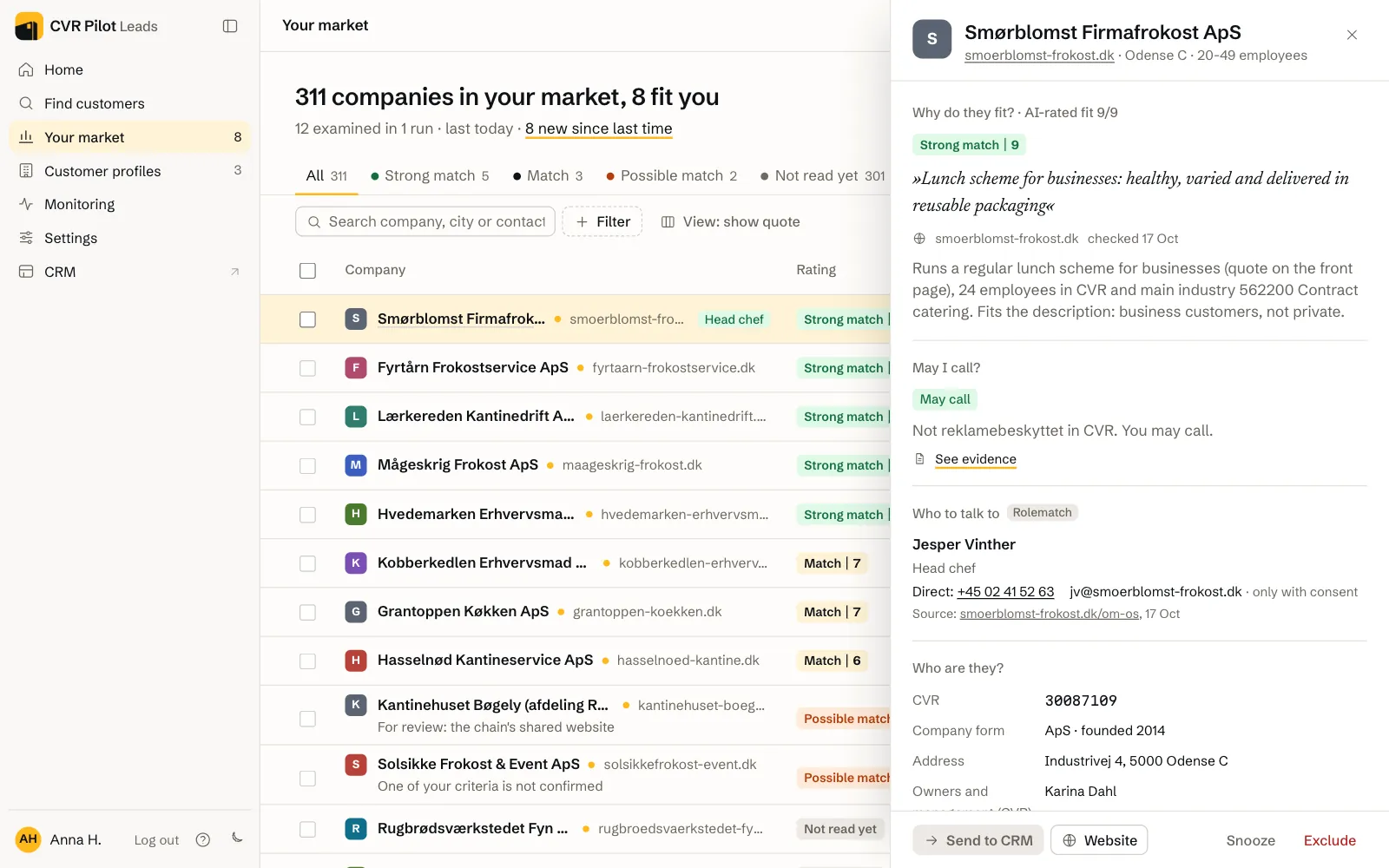
The fit score is the AI's assessment of how well the company matches your profile, and 9 is best. Each score has a rationale and a verbatim quote from the company's own website, so you can see why. If we cannot find the quote on the page again, we remove it. The AI is not allowed to make things up.
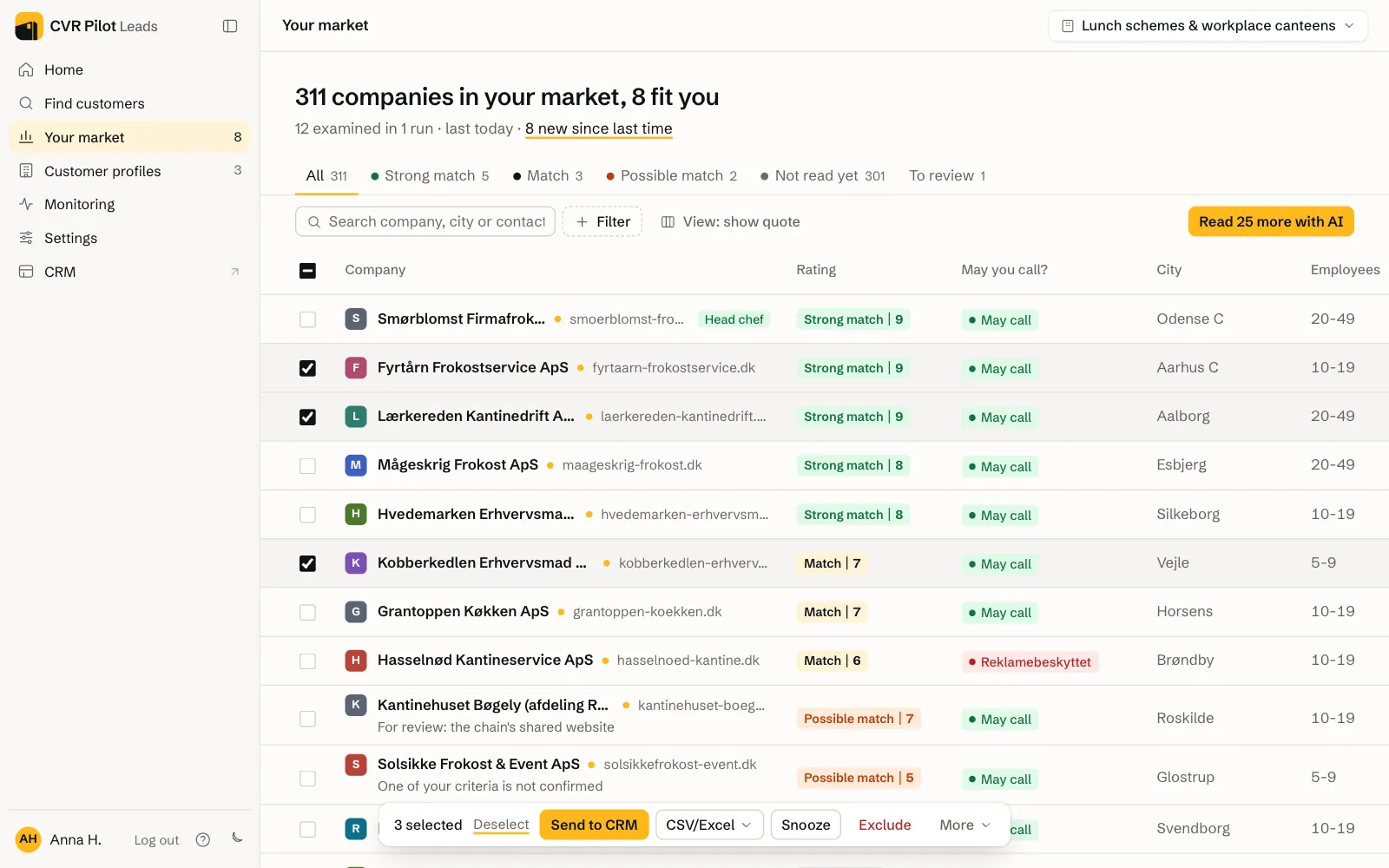
On the list, fit 8 and 9 show as Strong match, 6 and 7 as Match and below 6 as Possible match. Possible match is also used when a person needs to look at the lead. Companies the AI has not read show as Not read yet.
Can I remove the ones that don't fit?
Yes. Tick them under Your market and press Exclude (they are never suggested again) or Snooze (7 days). The customer profile lists "What we avoid": words, domains and company types you can edit yourself under Advanced view.
How do I know how certain a lead is?
Every lead shows whether the AI has read the site, when it was read, and where the contact detail came from: the company's own site or the register. "See evidence" shows the excerpt. If something is not verified, it says so.
Credits and pricing
What is a credit, and when is it used?
One credit is one lead that the AI has read and that fits you, with a fit score, a quote, a contact and an opening line. The market list from CVR costs no credits. It is included in your plan: at the first paid activation we go through your market once, see pricing. Companies the AI reads that don't fit cost nothing either. Before you press "Find my market", the card shows how many companies your market holds, the most credits the AI read can use, and how many you have. The AI never reads more leads than you have credits for.
What do I get in the trial month?
The trial month costs DKK 5 and gives you one search. We put your market from the CVR register on the list by the customer profile's industry codes, area and size, up to 300 companies, and Google Maps adds more. The AI reads the best websites first and shows you the 10 that fit best. Above the list it says how many companies your market holds and how many are strong matches. The rest stay on the list as Not read yet, and nothing is deleted. The trial search uses no credits. If you have websites you want checked, you can paste them. Export and CRM require a plan, and Autopilot requires Growth.
Do my unused credits carry over?
Credits you bought on top of your plan carry over as long as your subscription is active. The credits that come with your plan each month reset at the start of each new period.
Does Google Maps cost extra?
Google Maps has its own balance of lookups, separate from credits, and 1 lookup is 1 call to Google Maps. Starter includes 650 and Growth 1,300 lookups a month. If you need more, you can buy lookups under Settings → Plan and credits. The CVR register, the web and the websites you paste yourself never use lookups.
Google Maps runs in every search and adds companies and phone numbers that CVR lacks. The card under Find customers shows the search terms we use on Google Maps, and you can edit them under Advanced view. If only a few companies in your market have a website in CVR, the card says so, because then Google Maps finds the rest.
Do I pay per user?
No. Starter has 2 users and Growth 5, and the price is the same however many of them you use. See the current plans and pricing in the pricing section.
Compliance and GDPR
How does CVR Pilot handle marketing opt-out (reklamebeskyttelse)?
Under "May I call?" on each lead you get one of three answers:
- May call: the company is not opted out of marketing in CVR.
- Opted out, but the number is on their own website: you may call that number, because the company published it itself.
- Opted out, and the number is only in the register: do not make a sales call. We don't show the number, and the lead cannot be sent to your CRM.
If you want it documented, tick the leads you are about to call under Your market and choose More → Report: may we call?. The report shows, per company, whether it is opted out in CVR and where the number is on their own site, with the verbatim excerpt, the address and the date. § 19(2) of the CVR Act covers only the register's data. The report is a dated record of what we checked and when, and it does not guarantee that a call is lawful. The workspace owner can share it as a link for 30 days. See a sample compliance report, or read more in our guide on marketing opt-out (Danish).
What does "Owner is a private person, check the Robinson list" mean?
The note appears on leads where the company is owned by a private person: sole proprietorships (enkeltmandsvirksomhed), personally owned small businesses (PMV) and general partnerships (I/S). If the owner is on the Robinson list, the Danish register of people who have opted out of sales calls, you may not make a sales call. We cannot check the Robinson list for you yet, so check it yourself before you call.
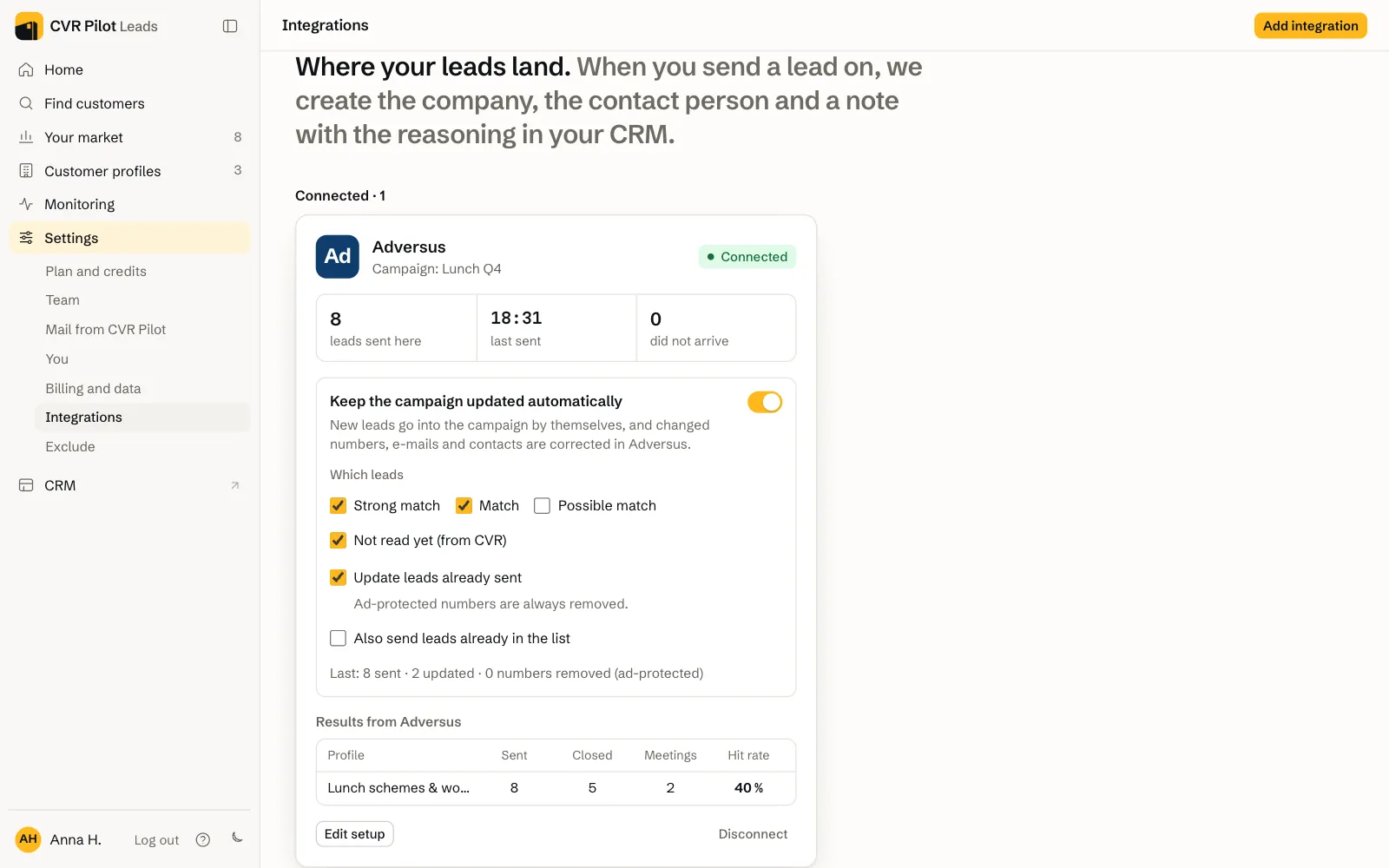
We don't hide the lead. It gets a "Robinson" tag in the list under Your market, and the note goes along in CSV and Excel (the Robinson check column), in Google Sheets and in the note when you send the lead to your CRM or to Adversus.
May I send cold email to the leads?
Not without consent. Under the Danish Marketing Practices Act (markedsføringsloven) § 10, electronic marketing requires prior consent, B2B included. CVR Pilot is a data and qualification tool and never sends marketing on your behalf. How you contact a lead is your own responsibility. Phone contact to businesses is generally lawful.
What happens to my data?
Your data is hosted in the EU. You can export your entire workspace at any time under Settings → Billing and data → Export my data and delete your account. Deletion removes your workspace from the live system immediately. See the details in the privacy policy.
Integrations and export
How do I get my leads into my CRM?
Tick the leads under Your market. A bar appears at the bottom with Send to CRM, CSV/Excel, Snooze, Exclude and More, where the marketing opt-out report is.
You connect your CRM under Settings → Integrations. Attio, HubSpot, Pipedrive and Google Sheets connect by signing in. Adversus connects with an API user from Adversus. The leads then go straight into a dialer campaign, and the call outcomes come back to CVR Pilot. With a webhook you can send each lead to any other system, for example Zapier or Make. CSV and Excel need no setup. CVR Pilot's own CRM comes with Growth and opens from CRM in the menu.
Can I import my existing customers?
Yes, under Settings → Exclude. Paste websites, e-mails or CVR numbers (e.g. DK-12345678 or 12345678), or drop in a CSV or TXT file. If you have connected a CRM, we pull the customers from it automatically. Those companies are never suggested again and never cost a credit.
Troubleshooting
My search returned no (or few) leads
Usually the description is too narrow. Write a little more in the description, or open Advanced view on the customer profile and loosen the threshold and the signal words. If the market is small, add an industry or a larger area. If many companies are marked Not read yet, you can have the AI read more under Your market. If that doesn't help, write to us from Help in the app, and we will look at the search ourselves.
My search failed
Try searching again. If it happens again, click Help and tell us which customer profile it was and when you searched. We can see your workspace ourselves and go straight to the search that failed.
How do I contact support?
Click Help (the question mark at the bottom left of the app) and write a subject and a message. We can see your e-mail and your workspace ourselves and reply by e-mail, usually the same day. You can also book 30 minutes.
Is the app available in English?
Yes, under Settings → You → Language. The app and your e-mails follow the choice, while the quotes from the companies' sites stay in Danish.